

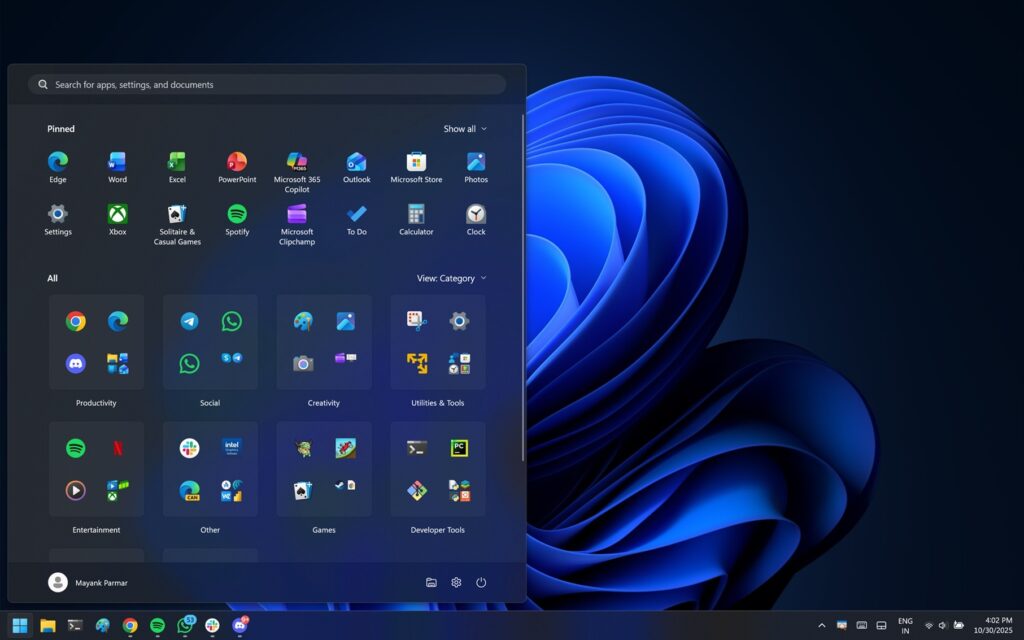
Microsoft’s latest update to Windows 11 introduces a revamped Start menu, a feature that has been gradually rolling out to users over recent months. With the release of Windows 11 KB5074109 as part of the January 2026 Patch Tuesday updates, many users are now seeing the new layout for the first time. This mandatory update aims to enhance user experience, though some users are calling for further improvements, such as a resize button.
The announcement comes as Microsoft continues its strategy of phased rollouts, which allows the company to incorporate user feedback into its updates. While the tech giant has not specified when the rollout will be complete, it remains committed to gradually implementing changes across the Windows 11 ecosystem. This approach extends beyond the Start menu, affecting other features and even minor bug fixes.
Understanding the New Start Menu
The redesigned Start menu in Windows 11 presents a single-page layout, a departure from the multi-page format of previous versions. This new design aims to streamline access to apps and features, with pinned apps displayed prominently, followed by an optional ‘Recommended’ section and a comprehensive app list organized either in a grid or by category.
Categories such as ‘Entertainment’ and ‘Productivity’ help users locate apps quickly, grouping related applications like Media Player and Groove Music together. The new interface provides more customization options, addressing long-standing user concerns about the number of clicks required to navigate the app list.
Challenges with the New Design
Despite its advantages, the new Start menu has drawn criticism for its height, which some users find excessive. This is largely due to Microsoft’s decision to fit all elements—pinned apps, recommendations, and the full app list—into a single view. To maintain a consistent layout, the Start menu uses a minimum height target, ensuring sufficient space for headers and content.
“In our tests, Windows Latest observed that the new Start menu appears to use scaled pixels to determine its size. If a laptop’s resolution is 1920×1080 and 100% scale with limited vertical space, Start can easily eat 90% of the height.”
Users can adjust the scaling settings in Settings > System > Display to modify the size of the Start menu. However, this is not a perfect solution, leading to calls for a resizable Start menu akin to that of Windows 10.
Looking Ahead: User Feedback and Future Updates
Microsoft’s decision not to include a resizable Start menu or allow taskbar movement to the top or sides has sparked debate among users. The company argues that such changes would disrupt the flow of animations, a key aspect of the Windows 11 user experience.
As the rollout continues, Microsoft is likely to monitor user feedback closely, potentially influencing future updates. The tech community remains divided on the effectiveness of the new Start menu, with some praising its streamlined design while others lament the lack of customization options.
“Unfortunately, Microsoft still has no plans to add a Windows 10-like resizable Start menu, and there are also no plans to let us move the taskbar to the top or left/right sides.”
Meanwhile, additional features such as ‘Share with Copilot’ and new battery icons have been added to the taskbar, though these updates are not yet universally available. As Microsoft continues its phased rollout, users can expect further refinements and enhancements to Windows 11.
The move represents Microsoft’s ongoing commitment to evolving its operating system based on user needs and technological advancements. As the tech landscape changes, so too will the features and functionalities of Windows 11, shaping the future of personal computing.