


For years, PC gamers eager to take their desktop library on the road faced a persistent challenge: Windows. While Valve’s Steam Deck offered a seamless, Linux-based console-like experience, Windows handhelds, even powerful ones, struggled with confusing desktop modes, finicky touchscreen setups, and irritating background notifications.
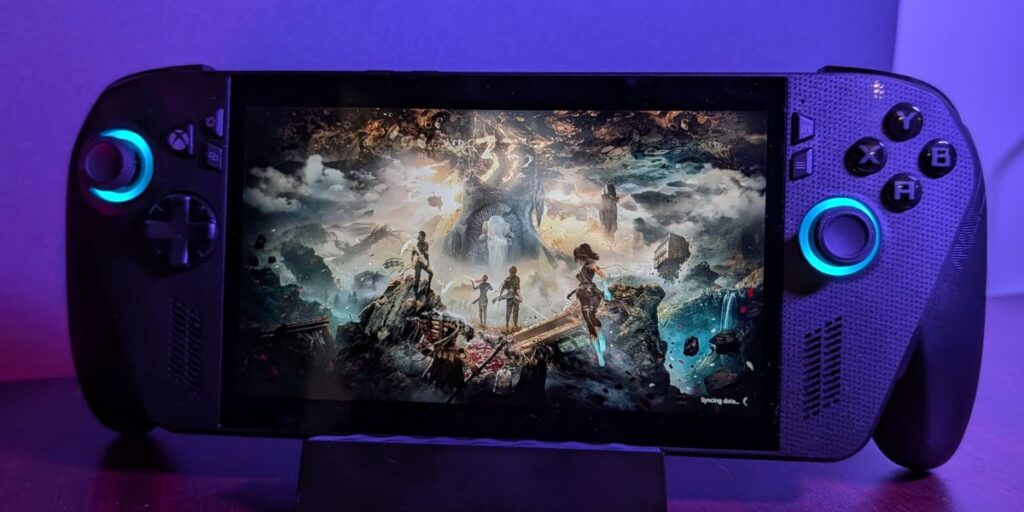
Enter the ASUS ROG Xbox Ally X. Marketed as a significant upgrade from last year’s formidable Ally, ASUS claims, “This is an Xbox.” But if this is an Xbox, then my Mitsubishi is a Ferrari. It’s not, by the way, but if they can dream, then so can I. While it’s not entirely an Xbox, it’s close and getting closer as they refine the systems. However, there’s still enough Windows in there to make gaming less seamless than simply turning on a console and jumping straight in.
Finally, Windows Gets Out of the Way
The real headline with the ROG Xbox Ally X is the introduction of the Xbox Full Screen Experience (FSE). ASUS has partnered with Microsoft to launch the Ally X (and the standard Ally) as the first devices to boot directly into the Xbox App, bypassing the bloated Windows 11 desktop environment altogether. This move is Microsoft’s direct response to SteamOS, and for the first time, a Windows handheld almost feels as intuitive as a dedicated console.
The change is evident from the moment you power it on. Setting up your Wi-Fi and signing into your Microsoft account can be done entirely with the controller, eliminating awkward finger-tapping on a setup screen designed for a keyboard and mouse. Once inside, the FSE is all about games. Game Pass takes center stage, but launching Steam, Epic Games Store, or Battle.net is integrated into the library, allowing you to install and play without ever seeing a desktop icon.
However, it’s not all perfect. The experience still has “PC” hangups that can cloud your rose-colored glasses. Annoying Windows popups occur quite regularly at the beginning as you approve the PC versions of Game Pass games to run. The initial bootup requires several updates in various areas of the device, but some might find that part of the fun.
Double the Goodness: Specs and Comfort
The performance of the Ally X is attributed to its impressive hardware packed into a relatively small form factor. The formidable AMD Z2 Extreme processor is the real hero here. ASUS didn’t just bump up the speed; they provided a serious memory and storage upgrade, configuring the device with a whopping 24GB of RAM and a generous 1TB SSD. This extra memory is vital for modern games and helps future-proof the device as much as possible, given that these premium-priced handhelds seem to update on a semi-regular basis.
ASUS Armory Crate Special Edition (ACSE) software serves as the performance heart of the Xbox Ally X, offering granular control over the powerful hardware. Accessible instantly via a dedicated button, the Command Center overlay allows you to switch seamlessly between crucial Operating Modes, such as Silent (for maximum battery life during light tasks), Performance (a great balance for general gaming), and Turbo (unleashing the full power of the Z2 Extreme when plugged in). For the true power user, the Manual Mode allows for fine-tuning the system.
While the 7-inch, 1080p, 120Hz FreeSync Premium display remains the same—and to be clear, it’s a great screen—its resolution is a perfect match for the Z2 Extreme’s power. The problem arises when comparing it to competitors like the MSI Claw or the Lenovo Legion Go 2, which boast much more vibrant, larger displays. Nevertheless, the Ally X is slightly heavier than its predecessor, weighing in at 1.58 lbs, but it’s undoubtedly more comfortable as a result.
Battling the Power Drain
Handhelds are power-hungry beasts, but ASUS has clearly listened to feedback on the original Ally. The Ally X is a resilient little machine. While it might still only last around 9 hours during general office use, running a demanding game like Cyberpunk or Call of Duty saw the battery hold out for an impressive 2 and a half hours. This performance makes it a great device for gamers on a long trip or just generally on-the-go.
The price is almost frightening in Australia. While the US is shocked at the “thousand dollar price tag,” in Australia, the cost is $1,599. However, the Ally X is a premium device capable of running your Game Pass, Steam Library, etc., so a higher price is expected. When compared to other high-spec handhelds on the market, especially those using the Z2 Extreme chip, it is competitively priced and offers a more refined software experience and better overall performance in most cases.
Ultimately, the ASUS ROG Xbox Ally X is an impressive device. It fixes the Windows problem, provides excellent gaming performance that outperforms a good chunk of the competition, and offers a comfortable, premium chassis. All it needs now are a few minor software tweaks to the FSE to smooth out the remaining kinks.
Reflecting on my first night using the device—after the updates and teething issues—I booted up “The Outer Worlds 2,” which worked flawlessly. I sat back on a bean bag and played for hours, never once thinking, “this screen is too small” or “why isn’t this in 4k.” I just played, the way a player plays, and had the time of my life. Since then, I’ve enjoyed multiple great sessions with different games like Clair Obscur: Expedition 33, Call of Duty Black Ops 7, and Cyberpunk 2077. Every experience has been positive. So yes, it’s worth it. After all, “This IS an Xbox.”