



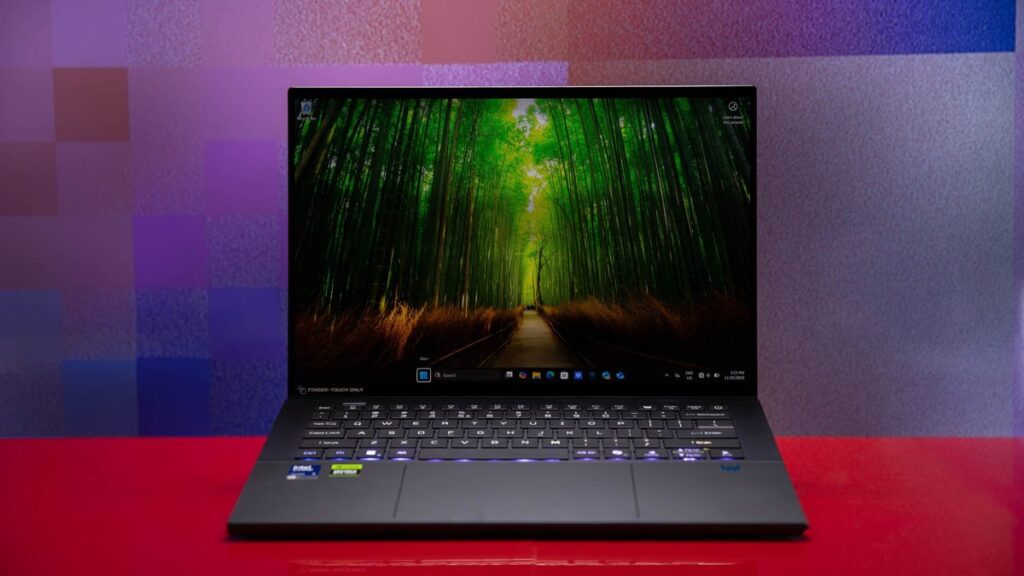
The Acer Predator Triton 14 AI enters the gaming laptop market with a promise of combining sleek design with robust performance. Priced at $2,499.99, this premium laptop offers a portable gaming experience with a high-quality metal build, a haptic touchpad, per-key RGB backlighting, and an OLED screen. However, its Intel Core Ultra 200V processor and Nvidia GeForce RTX 5070 graphics may leave some gamers underwhelmed compared to competitors. A notable screen issue further complicates its appeal, suggesting potential buyers consider alternatives like the Razer Blade 14 (2025), currently an Editors’ Choice pick in this category.
The announcement comes as Acer attempts to capture the attention of gamers seeking a thin-and-light laptop without sacrificing too much on performance. The Triton 14 AI’s configuration targets gamers with deep pockets, offering an Intel Core Ultra 9 288V CPU, 32GB of LPDDR5X memory, a 1TB PCIe 4.0 NVMe M.2 SSD, and an RTX 5070 GPU. The 14.5-inch OLED touch panel boasts a 2,880-by-1,800-pixel resolution and a 120Hz refresh rate, but the price tag might lead some to expect an RTX 5080 instead.
Configuration: For Decidedly Deep-Pocketed Gamers
From the outset, the Triton 14 AI is a costly system. Even the base model, the PT14-52T-972D, comes at a steep price. The Intel Core Ultra 9 288V, part of Intel’s “Lunar Lake” Core Ultra 2 series, features a neural processing unit capable of 48 trillion AI operations per second, qualifying the laptop as a Microsoft Copilot+ PC. Despite its AI capabilities, the RTX 5070 GPU, configured at a maximum graphics power of 110 watts, showed signs of throttling during performance testing.
The move represents Acer’s commitment to premium build quality and compact internal design, but these features contribute to the Triton’s high cost. The thermal requirements of a higher-tier RTX 5080 would challenge the system’s compact build, necessitating some temperature throttling to maintain portability.
Design: A Stylish Metal Build is the High Point
Mobility is key for 14-inch laptops, and the Triton nails the size and feel of a system ideal for on-the-go use. Measuring 0.93 by 12.7 by 8.8 inches and weighing 3.5 pounds, it’s not the lightest gaming laptop but remains acceptable for its category. The sturdy, high-quality milled-aluminum chassis contributes to its premium feel, complemented by a sleek, minimalist style with subtle Predator branding.
Keyboard and Touchpad: Smooth Typing and a Surprising Pad
The haptic touchpad, reminiscent of Dell’s XPS laptops, integrates seamlessly into the keyboard deck. While it requires some adjustment due to the lack of dedicated click buttons, it offers smooth operation and supports stylus input. The included stylus, though limited to the touchpad, offers 4,096 pressure levels and tilt support.
Typing on the Triton is comfortable, with enough travel for most users, although heavier typists might notice the keys bottoming out. The customizable RGB backlighting adds a touch of personalization to the user experience.
Display: Advanced Tech, But With Panel Woes
The OLED screen promises vibrant colors and sharp images but suffers from a noticeable grid-like pattern, particularly on bright backgrounds. This “screen door effect,” confirmed by Acer, results from the touch-input layer atop the OLED panel, detracting from the otherwise luxury display experience.
Ports and Other Features: Plenty of Connectivity
The Triton offers robust connectivity options, including USB 3.2 Type-C and Type-A ports, Thunderbolt 4, a microSD card slot, and HDMI 2.1. It also supports Wi-Fi 7 and Bluetooth 5.4 for fast wireless connections. The AeroBlade cooling fans and graphene thermal interface help manage heat effectively, though turbo mode can increase fan noise noticeably.
The PredatorSense app allows users to tweak system settings, including performance modes, enhancing the laptop’s adaptability to different usage scenarios.
Performance Testing: High on Portability, Low on Octane
Performance testing revealed the Triton’s limitations, particularly when compared to similarly priced competitors. While it handled productivity tasks adequately, it lagged behind in gaming performance, with frame rates dipping below expectations for an RTX 5070. The reliance on Nvidia’s DLSS underscores the importance of frame-rate boosting technologies for maintaining playable performance levels.
“The Triton trailed every other system tested here, even those with RTX 5060s. These frame rates are playable, but in some cases, only just, hovering right at or under the 60-frames-per-second mark.”
Battery life, however, proved impressive, surpassing the 10-hour mark and supporting the laptop’s portability. The display, despite its pattern issue, offered broad color-gamut coverage, second only to the Lenovo Legion in Adobe RGB.
In conclusion, the Acer Predator Triton 14 AI offers a blend of sleek design and portability with some performance compromises. While it excels in build quality and battery life, potential buyers should weigh these strengths against its gaming performance and screen issues. For those prioritizing portability with a willingness to accept some trade-offs, the Triton remains a viable option, albeit at a premium price.