


Microsoft’s latest update to Windows 11 has introduced a revamped Start menu, a change that has been gradually rolling out to users worldwide. If you haven’t seen it yet, the new Start menu might appear on your device after installing the Windows 11 KB5074109 update, part of the January 2026 Patch Tuesday. This update is mandatory, and many users are finally experiencing the new design.
The new Start menu is part of Microsoft’s ongoing strategy to introduce changes incrementally, based on user feedback. While the company has not confirmed when the rollout will conclude, it emphasizes that such updates are part of a broader, staged approach that includes even minor bug fixes.
Features and User Experience
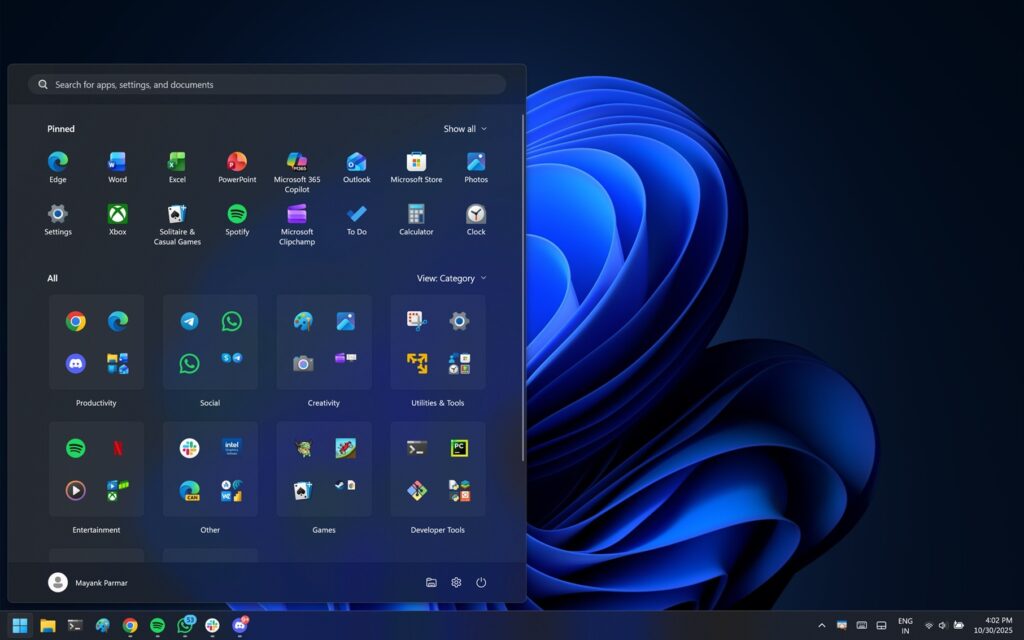
The redesigned Start menu is not a radical departure from its predecessor but offers a more streamlined, single-page layout. It organizes content into sections, starting with pinned apps, followed by an optional ‘Recommended’ section, and then a comprehensive app list. Users can opt to view this list in either a grid or categorized format, with apps grouped under headings like Entertainment or Productivity.
This new structure aims to address user concerns about the number of clicks required to access apps, providing more customization options. However, some users have noted that the menu appears too tall on certain PCs, a result of its single-page design that accommodates various sections.
Technical Insights
The perceived height issue arises because Windows sets a minimum height target for the Start menu to ensure ample space for headers and scrolling content. This design choice means that reducing the number of pinned apps or changing the display format does not significantly alter the menu’s size.
In tests conducted by Windows Latest, it was observed that the Start menu’s size is influenced by the device’s resolution and scaling settings. For instance, on a 1920×1080 resolution at 100% scale, the Start menu can occupy up to 90% of the screen height.
Adjusting the scaling settings in Settings > System > Display can modify the menu’s size, but this is not a foolproof solution. Many users are calling for a return to the resizable Start menu seen in Windows 10, a feature that Microsoft has yet to implement.
Microsoft’s Design Philosophy
Despite user requests for more flexible design options, such as a resizable Start menu or the ability to move the taskbar, Microsoft maintains that these changes could disrupt the ‘flow of animations’ integral to Windows 11’s user experience.
This design philosophy reflects a broader trend in software development, where user interface changes are balanced with maintaining a consistent and visually appealing experience. Microsoft’s gradual rollout strategy and attention to user feedback are indicative of its commitment to refining Windows 11.
Looking Ahead
As Microsoft continues to refine its operating system, the new Start menu is just one of many updates users can expect. The introduction of features like ‘Share with Copilot’ and new battery icons, although not yet universally available, highlights the company’s focus on enhancing functionality and aesthetics.
According to industry analysts, “Microsoft’s approach to incremental updates allows for a more controlled and user-driven evolution of Windows 11.”
While the current iteration of the Start menu may not satisfy all users, it represents a step forward in Microsoft’s ongoing efforts to adapt to user needs and technological advancements.
As the rollout progresses, users are encouraged to provide feedback, which will likely influence future updates. Whether or not Microsoft will reintroduce features from previous versions remains to be seen, but the company’s responsiveness to user input suggests that further changes are possible.